
How to Install OpenClaw (MoltBot) on Android
Transform your old tablet or phone into a local LLM agent gateway using Termux and Proot-Distro Ubuntu.
Why Run OpenClaw on Android?
Recently, I explored installing OpenClaw (MoltBot) on a Lenovo Android tablet with 4GB RAM. To my surprise, the setup was significantly easier than on a Raspberry Pi 4B (2GB), and the performance was notably better. This approach offers an economical and portable way to explore the world of local LLM agent gateways without investing in dedicated server hardware.
Hardware Configuration Used:
- Device: Lenovo Android Tablet (Old Model)
- Memory: 4GB RAM
- Comparison: Outperformed Raspberry Pi 4B (2GB) in stability and response speed.
Core Installation Steps
1Install Termux & Proot-Distro
First, install Termux (preferably from F-Droid for current updates). Open Termux and run:
pkg update && pkg upgrade
pkg install proot-distro
2Setup Ubuntu Environment
Install and login to your Ubuntu distribution:
proot-distro install ubuntu
proot-distro login ubuntu
3Install Dependencies
Inside the Ubuntu environment, update packages and install Node.js and Git:
apt-get update && apt-get upgrade
apt-get install git nodejs npm openssh-server
Pro-Tip: Install
sshd to connect from your PC via SSH for a better terminal experience
during the setup.
4Install and Run OpenClaw
You can install OpenClaw using the official scripted installer or via NPM. Since this is a Proot environment, the global NPM install is recommended for persistence.
Option A: Scripted Installer (Fastest)
curl -fsSL https://openclaw.ai/install.sh | bash
Option B: NPM Global Install
npm install -g openclaw@latest
openclaw onboard --install-daemon
Start the Gateway:
To start the local agent server manually, use the following command:
openclaw gateway --port 18789 --verbose
lightbulb Bonus Tip: Use the OpenClaw TUI
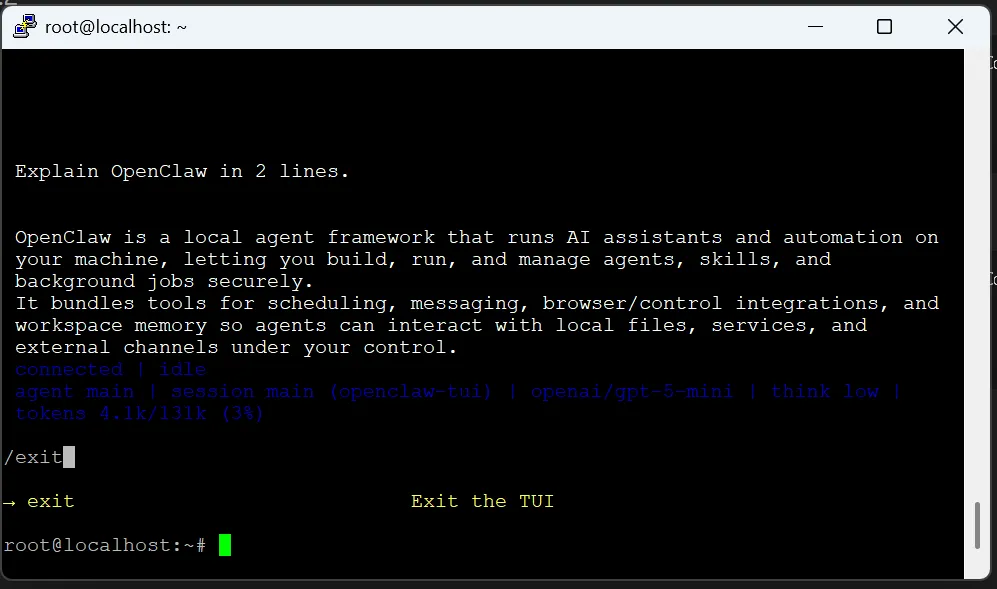
Instead of opening a browser, you can interact with OpenClaw directly from your terminal using the built-in TUI (Text User Interface). This is much faster and more reliable when working over SSH on an Android device.
openclaw tui
This command launches a low-latency terminal chat interface to test your model and instructions immediately.
Integrating Local SLMs via Ollama
For a truly local experience, you can install Ollama on Android to run Small Language Models (SLMs). I tested the following models:
- SmolLM2 (135M): Ultra-lightweight, fits easily in 4GB RAM.
- Qwen2.5-Coder (0.5B): might be good for POC, roughly 300-350MB.
The Verdict: While SLMs work, the response speed on a tablet can be slow. I also tried using free API keys from Gemini and OpenAI, but they often hit rate limits or expired too quickly to be useful for testing.
For a more stable experience, I recommend using any online LLM API key. I used an OpenAI API key. Topping up an account with as little as $5 provides a highly responsive and stable agent gateway that runs flawlessly on Android.
warning Troubleshooting: Network Interface Error
If you encounter the following error when starting OpenClaw:
SystemError [ERR_SYSTEM_ERROR]: A system error occurred:
uv_interface_addresses returned Unknown system error 13
This happens because Proot Ubuntu doesn't always have permission to access network interface addresses. Follow these 3 steps to fix it:
1 Create a Network Shim:
cat </root/uv_interface_addresses_fix.js const os = require('os'); os.networkInterfaces = () => ({ lo: [{ address: "127.0.0.1", netmask: "255.0.0.0", family: "IPv4", internal: true, cidr: "127.0.0.1/8", mac: "00:00:00:00:00:00" }] }); EOF
2 Set Node Options:
export NODE_OPTIONS="--require=/root/uv_interface_addresses_fix.js"
Add this line to your
~/.bashrc to make it permanent.
3 Run with Loopback Binding:
openclaw gateway --bind loopback
Frequently Asked Questions
Can I run this on a phone?
Yes, any modern Android phone with 4GB+ RAM should handle the OpenClaw gateway effectively.
Why was Gemini Free key unstable?
Free tier tokens often expire or hit rate limits quickly during testing. A paid API key (even with a small $5 top-up) offers massive stability improvements.
Is this better than a Raspberry Pi?
In my testing, a 4GB RAM tablet was easier to configure and faster than a 2GB Raspberry Pi 4B, making it a powerful alternative for home automation projects.
Take a Break — Play Free Strategy Games
We build AI tools and screen-free games. Try our free online strategy games — Tic Tac Toss, Trigem, Animal Park and more.
sports_esports Play Free GamesTake the Strategy Screen-Free
Loved building AI agents? You'll love our high-IQ tabletop games.

WAROUT
The RPG strategy card game inspired by the Mahabharata. Strategy over luck.
Learn More arrow_forward
Tic Tac Toss
A high-IQ twist on the classic game. Roll, jump, and outsmart your opponent.
Learn More arrow_forwardDiscussion & Feedback
Have questions about the installation? Drop a comment below.
This worked perfectly on my S21 Ultra. Termux setup was key!
Connect with the Lab
Questions about OpenClaw or our games? We'd love to hear from you.